Contract administrators
Prepare the claim without chasing the backup
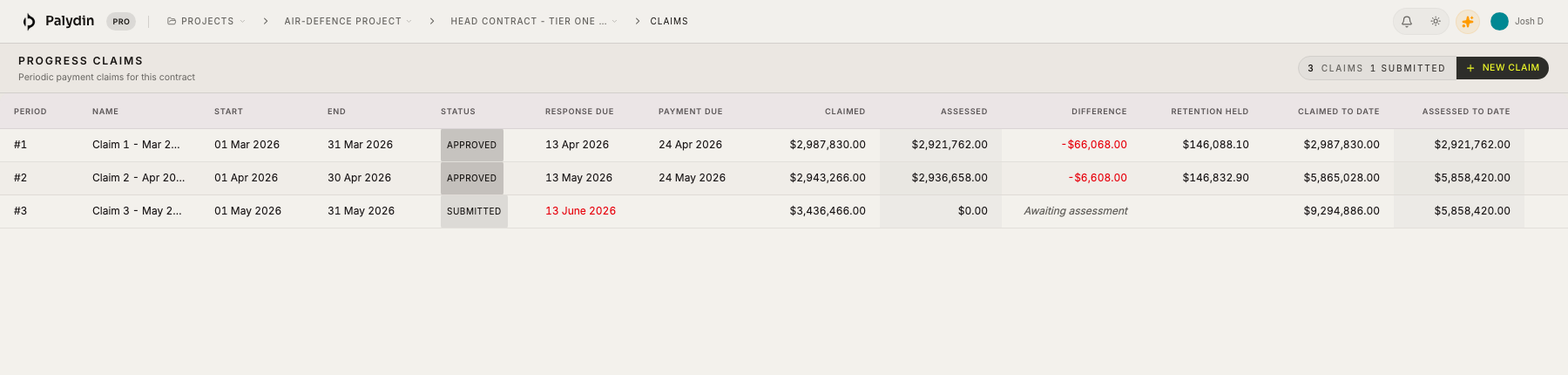
Palydin helps contract administrators keep claims, variations, retention, documents, SOPA dates, assessments, and history together through the monthly contract cycle.
Roles
Less chasing, fewer side trackers
Contract administrators are often the people stitching the claim together from emails, spreadsheets, PDFs, and comments. Palydin keeps that work in one place.
- Prepare claims from contract progress and prior assessments.
- Keep variations, retention, SOPA dates, and documents visible.
- Preserve the history behind claim and assessment changes.
How Palydin handles it
A workflow for the full commercial day.
Prepare
Open the claim period
Start from the contract, prior claims, current progress, and known changes.
Check
Review the backup
Keep documents, variations, retention, and SOPA timing close to the claim.
Track
Keep the history
Preserve submitted status, assessments, reasons, changes, and audit events.
The repeat tasks Palydin keeps together.
- 01
Open the next claim period.
- 02
Check previous assessments and claim-to-date values.
- 03
Attach or find supporting documents.
- 04
Track variations, retention, and payment schedule dates.
What gets easier when the record is clean.
- Less manual claim assembly.
- Easier answers when PMs, QSs, or assessors ask for backup.
- Cleaner handover when someone else picks up the file.
Follow the work behind the role.
FAQ
Direct answers for search visitors.
Verify the workflow before you talk to sales.
Start the Pro trial, load one contract, draft a real workflow, and decide from the product surface.